Inventory Management for Manufacturing
Inventory management is critical for any manufacturing company. It’s best if you have constant knowledge of the number of components that create your products as well as how many products you have on hand and can produce. Without proper tracking, you won’t know when to order more, how many products you need to ship or how many products you can sell.
Having a proper inventory management system in place can save you a lot of time and hassle. You won’t have to spend time manually tracking and counting all your stock. Automated and computerized systems help keep your manufacturing on track, up-to-date and accessible to everyone.

Inventory Management for Manufacturing Companies
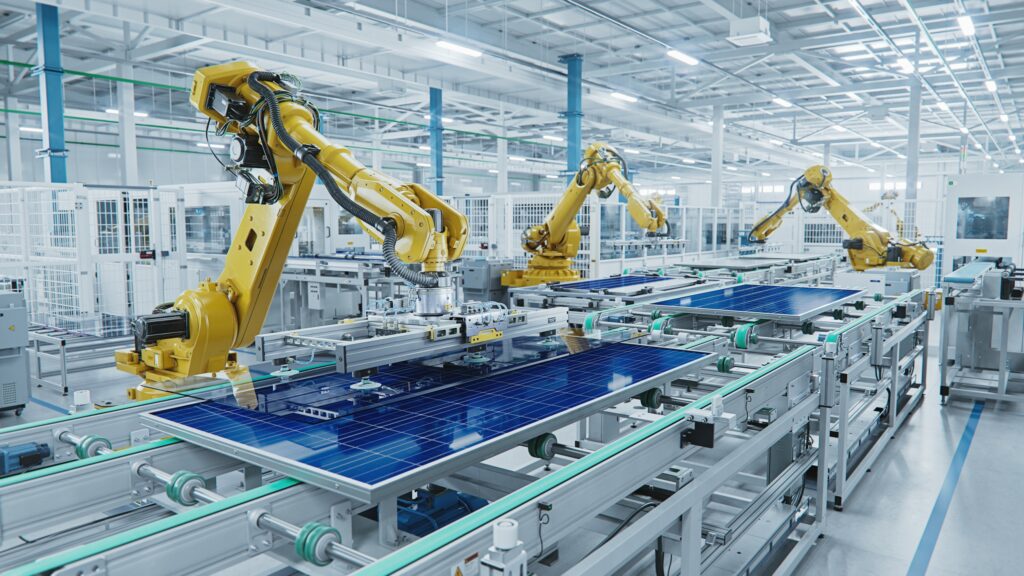
When it comes to the different types of manufacturing companies, such as discrete manufacturing and process manufacturing, the process for implementing an inventory management system is generally the same. You’ll want a program that keeps constant track of the parts or ingredients that come in as well as the finished products that leave.
If your manufacturing company has multiple locations and differing inventories, you’ll want a system that can help you manage the inventory in each location as well as a combined inventory. You need to be able to track components and products that transfer from one location to another and even to a distributor facility.
Finale makes it quick and simple to create finished products while tracking the usage of the components and raw materials by using the Builds for Light Assembly or Manufacturing feature. Finale Inventory’s Build module extends the end-to-end processes with specialized capabilities for manufacturers, wholesale distributors and others that need to assemble products or perform basic manufacturing activities to fulfill orders.
The system works from end to end, telling you whether you have the required parts for manufacturing, alerting you when to reorder them and deducting them from your inventory as you use them. This feature is a convenient and efficient way for a company to manage finished goods without a separate, full-scale enterprise resource planning (ERP) system.
Whether your company is large or small, and no matter what you manufacture, you can rely on Finale Inventory to provide you with the best solution for manufacturing inventory management. With Finale, you can easily track every necessary component, ingredient, part and product your business currently has. You’ll always have an accurate tally of everything you need when you need it the most and an understanding of what you’ll need in the future and when you should place an order.
Creating a Build with Finale Inventory - Video Tutorial
Video Transcript
Hi, this is Shaquille at Finale Inventory. In this short video demonstration, we’ll be discussing how to create an assembly line or manufacturing build using Finale Inventory’s build feature.
So we mentioned assembly line and manufacturing, but what exactly is a build? In Finale, when we talk about a build, we’re generally referring to light manufacturing, the process in which you would essentially consume several products to create a brand new product.
To execute on a process like that, we would need to leverage some kind of blueprint or recipe that would tell us the components of that product. So this is where, in Finale, we would leverage our bill of materials. So let’s take a look at how we can create one of those. Here I have my first aid kit, and I’m gonna create that bill of material or that recipe that details the components of my build. So I’m going to add the first component, which is my EpiPen. I’m gonna add the remaining components now. So at this point, we would need to add the quantity amounts for the total build.
Here I’m detailing to Finale that in order to make a first aid kit, I would first need to consume this quantity level for each of these products. So here I can create a potential quantity of 10 due to my limiting factor being my EpiPen, which I only have 10 of. So at this point, I’m going to save changes and we’re gonna navigate a little bit over to the build screen so that we can see how that looks from that side.
We can get to builds from the navigation menu right here on the home screen under builds. Or we can also use the navigation bar and search for builds here.
Let’s create a build so we can use the Create a Build option here. At this point, we can opt to use a couple of different naming conventions. We can use a system-generated ID, or we can use some unique IDs for identifying our builds. Sometimes we may opt to use the worker name that’s assigned to generating the build, or we can use a date if we’re doing things like using lot IDs so that we can better identify when this build was executed and increase some traceability. So in this case, I’m gonna use today’s date.
So here we are on the builds details page where we can select the product that we wanna produce. So we’re gonna select our finished goods first. So in this case our kit, first aid kit, and here we can see that finale will automatically generate that recipe or that blueprint for this finished. Good. So, to make this product the stock that we’ll be consuming. The EpiPen, the gauze the aspirin, the pamphlet, as well as that first aid case. The next thing that we want to typically identify is the quantity that we want to produce. So in this case, I want to produce 10 here. We can do, use a lot ID that we wanna establish for this finished good. So I’m gonna use the most recent expiration date for the product that I’m using.
So here, in this case, I’m gonna detail June 5th, 2030. The sub-location we want to produce the finished goods in. We can add a description field as well if we have any additional information we wanna add before we complete this particular build once we’re done, we can just press start and complete. Although we didn’t need to, we can actually change the quantity numbers for each sub-location for the stock that we want to consume. So if we had this particular product existing in other sub-locations, our different lot IDs, we can distinguish which one we actually want to consume. In this case, we consumed all the EpiPens, so there was no need to distinguish between those two, and our other products all existed within one sub-location.
You can also see for the stock to produce, we actually do get that increase of 10. which we entered in here originally. And while we can see and review all this information here, we can also see that on our stock page, which we should do right here. We can see now that we’re actually holding stock for the first aid kit, whereas previously we weren’t holding any stock values and now we no longer have any values for our EpiPen or our gauze. We still have some units remaining for these products because we previously had 100 of each.
We can also look at re-traceability when it comes to our builds. If we take a look at our stock history page, let’s put on some filters so that we can see this product a little bit easier here. We can see that we created a build and that we consumed five for this particular lot ID, and we consumed the remaining five for this lot ID totaling 10 so that we could create these 10 for first aid kits. This will really enhance your traceability when it comes to your light. Manufacturing helps aid in that re-traceability, so when customers respond to you, to your orders. Notices of, sicknesses or things of that nature or expired goods, we can go back to these builds using these lot IDs and check those expiration dates and call back all the orders that were associated with them.
In addition to this traceability, we can also see that our product at previously had no average cost associated with it now has an average cost. The average cost is attributed to the products that we use to consume. To make up this first aid kit that ends our demonstration on how to create products or finished goods with Finale’s light manufacturing option.
If you have any questions or concerns, please feel free to reach out to us at [email protected] and we’d be happy to help.
Hi, this is Shaquille at Finale Inventory. In this short video demonstration, we’ll be discussing how to create an assembly line or manufacturing build using Finale Inventory’s build feature.
So we mentioned assembly line and manufacturing, but what exactly is a build? In Finale, when we talk about a build, we’re generally referring to light manufacturing, the process in which you would essentially consume several products to create a brand new product.
To execute on a process like that, we would need to leverage some kind of blueprint or recipe that would tell us the components of that product. So this is where, in Finale, we would leverage our bill of materials. So let’s take a look at how we can create one of those. Here I have my first aid kit, and I’m gonna create that bill of material or that recipe that details the components of my build. So I’m going to add the first component, which is my EpiPen. I’m gonna add the remaining components now. So at this point, we would need to add the quantity amounts for the total build.
Here I’m detailing to Finale that in order to make a first aid kit, I would first need to consume this quantity level for each of these products. So here I can create a potential quantity of 10 due to my limiting factor being my EpiPen, which I only have 10 of. So at this point, I’m going to save changes and we’re gonna navigate a little bit over to the build screen so that we can see how that looks from that side.
We can get to builds from the navigation menu right here on the home screen under builds. Or we can also use the navigation bar and search for builds here.
Let’s create a build so we can use the Create a Build option here. At this point, we can opt to use a couple of different naming conventions. We can use a system-generated ID, or we can use some unique IDs for identifying our builds. Sometimes we may opt to use the worker name that’s assigned to generating the build, or we can use a date if we’re doing things like using lot IDs so that we can better identify when this build was executed and increase some traceability. So in this case, I’m gonna use today’s date.
So here we are on the builds details page where we can select the product that we wanna produce. So we’re gonna select our finished goods first. So in this case our kit, first aid kit, and here we can see that finale will automatically generate that recipe or that blueprint for this finished. Good. So, to make this product the stock that we’ll be consuming. The EpiPen, the gauze the aspirin, the pamphlet, as well as that first aid case. The next thing that we want to typically identify is the quantity that we want to produce. So in this case, I want to produce 10 here. We can do, use a lot ID that we wanna establish for this finished good. So I’m gonna use the most recent expiration date for the product that I’m using.
So here, in this case, I’m gonna detail June 5th, 2030. The sub-location we want to produce the finished goods in. We can add a description field as well if we have any additional information we wanna add before we complete this particular build once we’re done, we can just press start and complete. Although we didn’t need to, we can actually change the quantity numbers for each sub-location for the stock that we want to consume. So if we had this particular product existing in other sub-locations, our different lot IDs, we can distinguish which one we actually want to consume. In this case, we consumed all the EpiPens, so there was no need to distinguish between those two, and our other products all existed within one sub-location.
You can also see for the stock to produce, we actually do get that increase of 10. which we entered in here originally. And while we can see and review all this information here, we can also see that on our stock page, which we should do right here. We can see now that we’re actually holding stock for the first aid kit, whereas previously we weren’t holding any stock values and now we no longer have any values for our EpiPen or our gauze. We still have some units remaining for these products because we previously had 100 of each.
We can also look at re-traceability when it comes to our builds. If we take a look at our stock history page, let’s put on some filters so that we can see this product a little bit easier here. We can see that we created a build and that we consumed five for this particular lot ID, and we consumed the remaining five for this lot ID totaling 10 so that we could create these 10 for first aid kits. This will really enhance your traceability when it comes to your light. Manufacturing helps aid in that re-traceability, so when customers respond to you, to your orders. Notices of, sicknesses or things of that nature or expired goods, we can go back to these builds using these lot IDs and check those expiration dates and call back all the orders that were associated with them.
In addition to this traceability, we can also see that our product at previously had no average cost associated with it now has an average cost. The average cost is attributed to the products that we use to consume. To make up this first aid kit that ends our demonstration on how to create products or finished goods with Finale’s light manufacturing option.
If you have any questions or concerns, please feel free to reach out to us at [email protected] and we’d be happy to help.
Benefits of Manufacturing Inventory Management With Finale Inventory
When you use Finale’s inventory management software, you’ll have access to many useful tools that will improve the item management and tracking aspect of your business and can increase employee productivity.
Builds Module and Bills of Materials Software
Sometimes, fulfilling orders involves assembling finished products from various inventory items. To ensure you always have enough parts, use Finale’s Builds capabilities to help you track the inventory you use.
When you receive a custom order, our manufacturing inventory software lets you generate a bill of materials showing all the raw materials you need to manufacture the product. If the material is unavailable, you’ll receive an alert telling you to order it or when you can expect to receive it. As you manufacture the item, the system automatically deducts the resources from your inventory, allowing you to monitor all the materials you have on hand.
You’ll start with making a bill of materials (BOM) in Finale for the items you’re assembling. A bill of materials in manufacturing is a detailed list of all the raw materials you’ll need to produce or assemble your product. Our manufacturing inventory management system will tell you if you have these components on hand or whether you need to order them separately for a specific job.
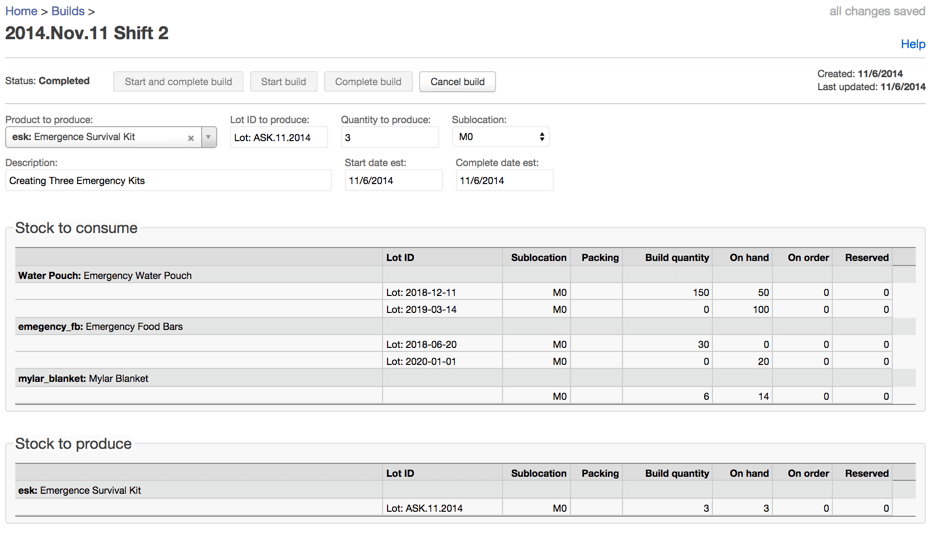
Beyond keeping track of your purchases, Builds lets you trace your finished product and all of its components with unique serial numbers. If customers alert you about product malfunctions, you can easily look up the exact items they purchased to determine your next steps for addressing the issue.
Finale’s software can support all your build needs, whether you’re building in response to customer orders or filling up your warehouse by assembling products in advance.
Full Traceability
One of the most beneficial features of the Builds module is its quick and accurate traceability. When you use a specific lot ID or serial number for your products, the system securely stores each build and allows you to access it whenever you need it. This feature is especially beneficial if a customer contacts you about a potential defect.
The system shows you the exact raw material components used to manufacture each item. Once you pinpoint the source, you can contact your supplier to alert them to the issue and request replacement materials.
Tailored to Fit Your Manufacturing Needs
The Build module works well for all manufacturing companies, whether you build all your inventory as stock items, manufacture your products contingent upon the orders you receive or operate using a combination of both. A build-to-stock system means that you manufacture items based on your inventory levels regardless of customer demand. When you use a build-to-order system, you manufacture an order based on your customer’s specific needs.
Build-to-order systems are similar to just-in-time (JIT) programs, operating on lean manufacturing principles to minimize wasted time and maximize material usage. Companies develop JIT programs based on their customers’ exact product and volume requirements.
How Finale Inventory Can Help With Manufacturing Inventory Control
Finale Inventory is your one-stop solution for managing your manufacturing inventory. Finale Inventory handles all the small details and lets you focus on other aspects of your manufacturing business. Don’t let yourself fall behind with your inventory management. With proper inventory management software, you can keep your company above the rest and maintain quality assurance for you, your employees and your customers.
At Finale Inventory, we know how important inventory management is for any business. Our inventory management solutions integrate all inventory components of your business — plant management, sales, finance, inventory and raw materials procurement.
Schedule a live demo today to learn more about how Finale can help your manufacturing business!
Would You Like to See Finale in Action?
Get started today with a free real-time demo to learn more about Finale Inventory.